
Follow the flight.
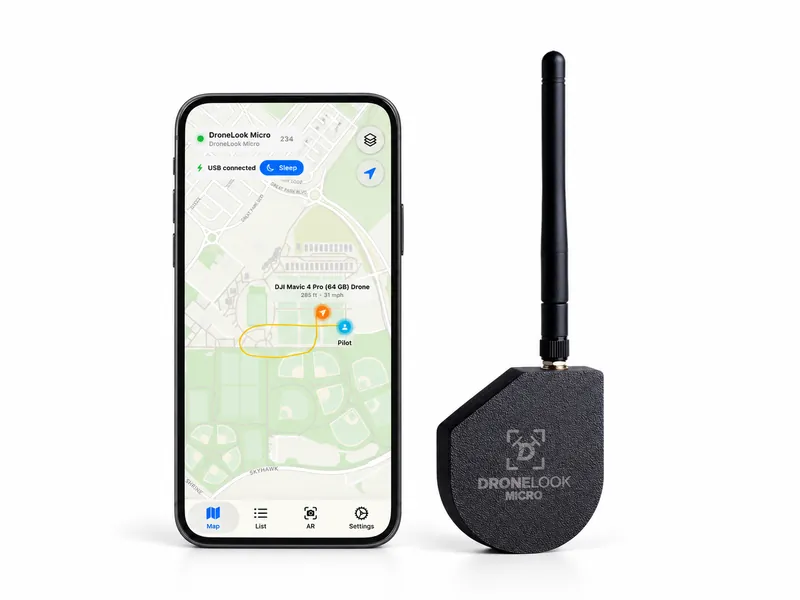
See the drone’s position, flight path, altitude, and speed. Select an aircraft to check its broadcast details.
DroneLook Micro · Handheld Remote ID receiver
Take Micro into the field. See nearby drones on the live map, follow their flight paths, and find the reported pilot location when it’s available.
$200 USD
Free U.S. shipping
Currently supported on iPhone only. Android support is coming.
Ships within 5 days. U.S. orders only. Phone not included. Secure checkout with Stripe.
Live drone & pilot locations
Standalone recording
USB-C powered
Detection in the field
Micro receives Remote ID broadcasts and brings them into the DroneLook app, so you can see where a flight is happening and what the drone is reporting.
See the drone’s position, flight path, altitude, and speed. Select an aircraft to check its broadcast details.
View the pilot or takeoff location when it’s included in the Remote ID broadcast. Use the AR finder to see the direction of a detected drone.
Micro can scan and record on its own. Reconnect to the app to sync the activity and review the flights you received.
Recorded with the DroneLook app
Real app recordings, from following a flight on the map to finding its direction through the camera.
Watch the drone, its trail, and the reported pilot location update together on the map.
Silent video · 23 seconds. Text description below.
The DroneLook app’s Map tab shows sports fields and nearby streets. Micro is connected by USB. An orange aircraft marker is labeled “DJI Mavic 4 Pro (64 GB) Drone.” A yellow line records its flight path, and a blue marker labeled “Pilot” sits to the right of the fields.
The drone moves along the bottom of a loop, then turns upward near the pilot marker. Its altitude and speed labels update as it moves. The pilot marker stays in the same location while the drone continues upward, away from the loop. The map recenters and the yellow trail preserves the route it has flown.
The recording stays on the live map throughout, showing how the drone’s position, recorded path, and reported pilot location can be viewed together. There is no audio.
Select a detected drone and use the phone’s camera view to follow its direction.
Silent video · 30 seconds. Text description below.
The DroneLook app’s AR tab shows the phone’s camera view of a path, trees, and blue sky. “DJI Mavic 4 Pro (64 GB) Drone” is already selected as the AR target. An orange circular marker overlays the sky in the drone’s direction, with a “High confidence” label below it.
A panel lists the selected drone’s distance, bearing, Remote ID height, and elevation angle. It also shows tracking status and adaptive channel 6. As the phone moves, the camera view and target marker shift together. The displayed distance stays around 69–70 meters.
Near the end, the camera tilts upward to follow the marker higher into the sky. The reported height rises from roughly 52 feet to over 100 feet, and the elevation angle increases. The same drone remains selected throughout. There is no audio.
Take it with you
Portable detection for the places your day takes you.
Check nearby drone activity while on patrol, at an event, or responding to a report.
Bring a receiver to the location you’re working in and see the Remote ID activity around you.
See nearby broadcasts and check the identification and location information your drone is sending.
The details
Have a particular phone or field setup in mind? We can help you check what you need before you get started.
Talk through your setup| Detection | 2.4 GHz Wi-Fi and Bluetooth Remote ID broadcasts |
|---|---|
| Power | USB-C |
| Antenna | Removable external antenna with SMA connection |
| In the field | Standalone scanning and recording |
| App connection | Live viewing and sync when you reconnect |
| Location details | Drone, pilot, or takeoff location when broadcast |
Remote ID is a drone’s broadcast of its ID, position, altitude, and speed over Bluetooth or Wi-Fi. DroneLook receives supported broadcasts and displays them on a map.
Built-in Remote ID reports the control station’s location. An add-on broadcast module reports the takeoff point instead. This is the source of the reported pilot or takeoff location you see in DroneLook.
Detection range varies with terrain, buildings, and interference. In the right conditions, DroneLook can receive drone broadcasts from about 2–3 miles away.
Read the FAA’s Remote ID overview$200 USD with free U.S. shipping. Ships within 5 days. Have a question about your setup? Get in touch.